User Information and License Camera Licenses Options Scheduler Self Check Web Server Basic Internet Passwords Commands Proxy IP Filters Plugins
Self Check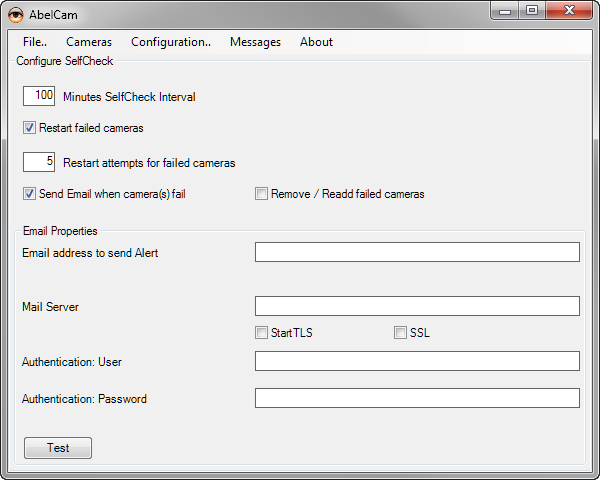
AbelCams SelfChecks tests the functionality of AbelCam services.
- Cameras: SelfCheck grabs two images from the capture devices and compares them pixel by pixel. If they are identical, the capture device does not work correctly ( due to digital noise images are never identical ) and the capture device can be restarted.
- WebServer: SelfCheck makes a http request to itself. If the request fails, the webserver will be restarted
SelfCheck Interval: how often should the SelfCheck be executed
Restart failed cameras: check this to restart failed cameras. If not checked, cameras remain disabled.
Number of restart attempts: how many times should a disabled camera be restarted
Send Email when camera(s) fail: check this to receive a notfication by email
Remove / Readd failed cameras: check this to let SelfCheck remove and readd a failed camera. Some times camera problems can be resolved this way if just enabling them does not solve the problem.
Email Properties
Email address: email used for notification
Mail Server: SMTP Server to send notification to. If your server does not run on the standard port, you may include the port number like this: mail.example.com:465
StartTLS / SSL: check either of these if your mail server requires an encrypted connection
Authentication: enter Username and Password if required by your mail server
Help Topics