User Information and License Camera Licenses Options Scheduler Self Check Web Server Basic Internet Passwords Commands Proxy IP Filters Plugins
PasswordsExtended mode with user authentication is available only with both "I am a AbelCam Expert" and "Use BETA features" in Configuration/Options checked.
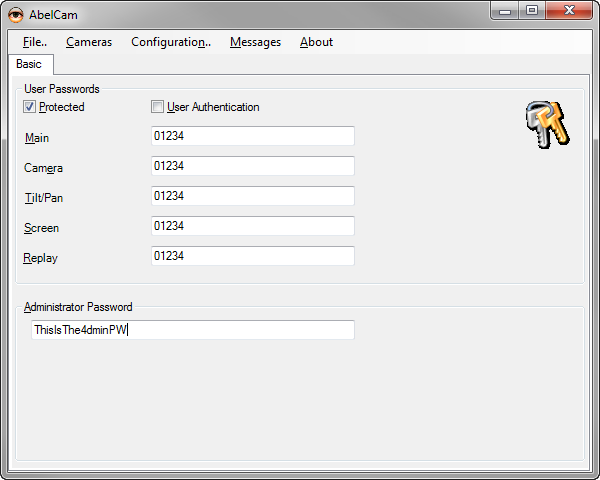
Protected: check this to enable password on the web server
*User Authentication: check this to enable user authentication. )
Main: this is the main password for html pages
Camera: this is the password to access jpeg images and motion jpeg streams
Tilt/Pan: this is the pasword to access Pan/Tilt commands
Screen: this is the password to access the screen capture
If no password is set, no authentification is required.
Administrator Password
Once the admin password is set, the admin interface at
http://localhost:8080/server-admin
becomes available.
Basic Authentication
AbelCam does not check the user name entry in the authentication, only the password has to be correct.
Extended Mode
*) user authentication is available only with both "I am a AbelCam Expert" and "Use BETA features" in Configuration/Options checked.
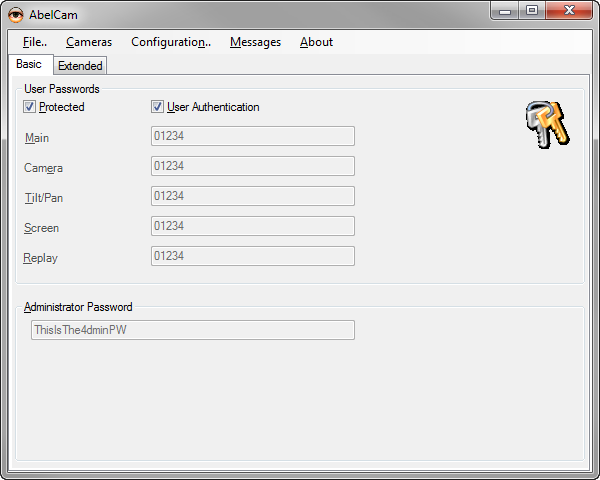
Once you check User Authentication, the Extended register is visible. It offers the following options:
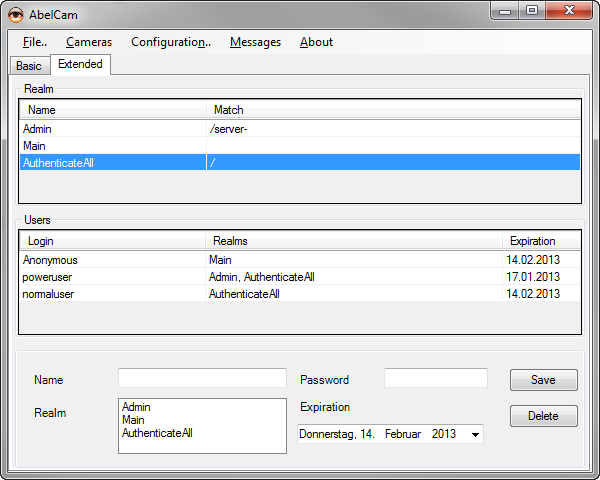
Realm
Realms define areas for authentication.
The Main realm is predefined and covers all URLs which have no realm assigned
The Admin realm is predefined and covers all URLs which are related to the web admin interface
You may define as many realms as you like.
Users
Users have Login names, passwords, a expiration date and realms.
The Anonymous user is predefined and is used when there's no authentication.
All other users must have at least one realm assigned.
In the example above, the AuthenticateAll realm causes all URLs to require authentication.
The user poweruser may access all web pages including admin pages.
The user normaluser can access all normal pages excluding admin pages.
Anonymous has only the Main realm assigned. As the realm AuthenticateAll includes all possible URLs, authentication is required for all URLs and Anonymous does not have access.
See also: User Authentication in Wiki
Help Topics